Your web browser is out of date. Update your browser for more security, speed and the best experience on this site.
Going faster by breaking everything down: micro frontends via web components
There is a proverb that says the whole is greater than the sum of its parts. As a team, you can tackle challenges together that you cannot solve as individuals. It's the reason why companies are formed, where hundreds of people come together to develop fantastic apps, websites, and platforms, for example.
In practice, there are also many disadvantages to such collaboration. Just ask Nick Lauryssen, who delivered a keynote on micro frontends at Haxx (Axxes Conference). Nick has been working as a Team Lead Frontend Development at Axxes for seven years, where he has been working for Katoen Natie since 2018.
"We all know about microservices on the backend, which neatly divide everything by domain," Nick said in his presentation, "but the frontend is often still a monolith that accesses all the microservices." This can cause problems in large projects. The more features you develop, the harder it is to coordinate everything before you can release. At that point, you realize that it's not necessarily more productive to have more developers working on the same project.
When you want to make a change in such a monolith, it often impacts all the projects associated with it. For example, if you want to switch to a new version of Wonder.js for one feature, you have to do that everywhere immediately.
Break the monolith
Of course, that's not scalable. As a company, you want to increase development speed and give teams the freedom to make as many decisions as possible. You want to avoid legacy code and the need to come up with a large migration plan for every change you want to make.
Nick's solution? Micro frontends. An architecture where frontend applications can operate independently of each other and come together as a whole. In simple terms: you're breaking down your monolith vertically per feature, making it easier to upgrade.
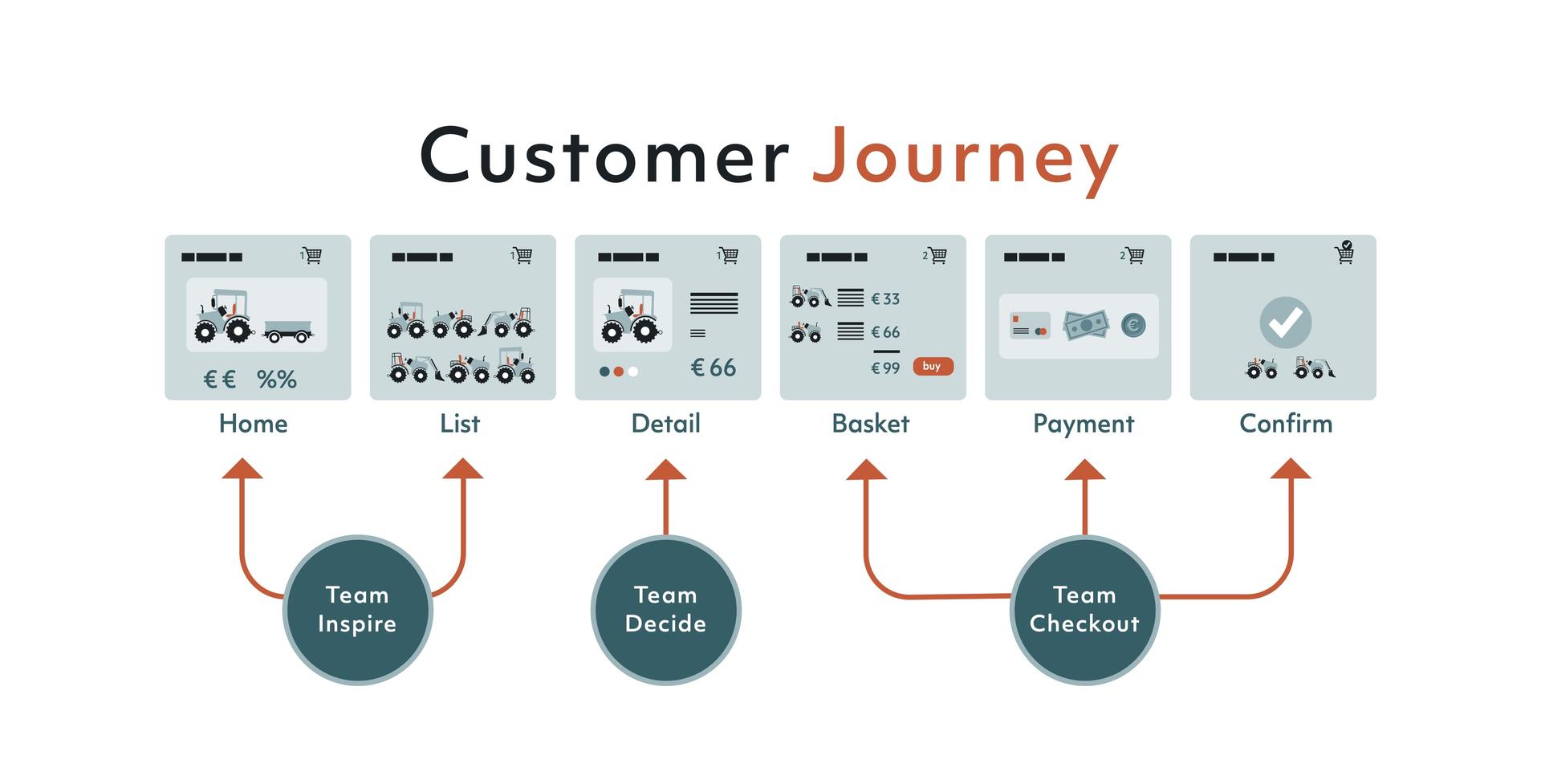
In the example above, you can see how three separate teams collaborate on the development of a large e-commerce website. Each team takes on a part of the customer journey: the phase where we inspire customers, the decision-making phase, and the checkout phase. By splitting these tasks, each team can specialize and focus on developing specific detail pages.
In reality, of course, it's less delineated: a page often consists of various components. For example, on the product detail page, there's also a payment button. Not everyone needs to know what happens when you click on it, but the team handling the checkout process does. The same goes for the suggestions you receive when you want to checkout. Each of these is a fragment, operating as mini-applications independently.
Micro frontends allow teams to develop features independently, which they can then make available as fragments or pages. These individual components later come together in one layer, the shell application, forming a visually cohesive experience for the user. Imagine a website or application where certain parts of a page are developed by one team while other elements on the same page are developed by another team. The result? Teams can release specific features independently of each other. This is especially important for large teams, providing them with the necessary flexibility.
From theory to practice
So far, the theory sounds great, but how do you implement these micro frontends? As Nick explained in his presentation, there are several ways to do this. You could work through build-time integrations by turning all micro frontends into NPM Packages and then installing them in your shell application. However, this method is somewhat outdated, mainly because it creates a bottleneck in your container application.
That's why it's better to look at runtime integrations, where micro frontends come together in your browser for single page applications. There are several possible options for this. For example, Spotify used Iframes for a long time, which does the job but isn't very practical.
A more modern approach is integration via JavaScript. You host the static bundle files in a specific location, and then load the appropriate micro frontend based on your location pathname. For this, you agree on certain contracts with your colleagues, outlining how the micro frontend should be loaded.
Micro frontends via web components
Nick focused on a fourth method in his presentation: working with web components. This is an umbrella term for browser standards that allow you to create new, reusable elements in the browser. For those hearing about it for the first time, it may seem complex, but in reality, it's quite manageable. These elements can be reused throughout your application. Creating web components involves various aspects. Custom Elements, for example, are a set of JavaScript APIs that allow you to define certain elements and what you expect from them. They are fundamental for web components because they allow you to create the new elements. The Shadow DOM is used to create an isolated DOM tree, thereby shielding part of the CSS from the rest of your application.
For those familiar with development, this looks pretty straightforward: it's a JavaScript Class describing some lifecycles. These lifecycles dictate what should happen when and how the DOM should be integrated. You'll always need to define a dash to avoid conflicts with future browser elements, ensuring there's no confusion with, for example, a regular button on your online platform.
Indispensable Links
Web components are the ideal solution to prevent everyone from doing their own thing. A content library could also be a solution, but when your micro frontends consist of different frameworks, it quickly becomes a complex story. Web components can also play a role in rolling out your design system. They are independent of other technologies, their styling is isolated, and except for Internet Explorer, they are supported by every browser.
For Nick and his colleagues, micro frontends and web components have become indispensable. Developing good software is already difficult, doing it in a scalable way is even more so. Micro frontends play an important role in this. On the other hand, web components, especially in large applications, can play an important role in integrating those micro frontends.
Curious for more Axxes Insights?

Nick Lauryssen